Author Archives: Cristian Croitoriu

E-mail Marketing Campaigns

E-mail Marketing Campaigns

E-mail Marketing Campaigns


Email marketing automation can build brand loyalty, increase customer engagement and convert your customers without you lifting a finger.

In the age of Automated Restaurant ordering and Self-Checkout Grocery Systems, Email Marketing Automation is the logical next step for your sales and marketing strategy.

What exactly is Email Marketing Automation?


Email Marketing Automation involves the use of email automation software to create specific email customer journeys. Email automation can onboard and re-engage your customers using pre-planned customer journeys. Once set up these customer journeys market to and communicate with your customers without any management from you or your staff.

What can Email Marketing Automation do for you?


A 2015 study found that 80% of marketing automation users saw their number of leads increase, and 77% saw the number of conversions increase.

Here are some tips to make your email marketing journey’s even better:

Test – People may not admit to judging a book by its cover, but they do judge an email by its subject line. Studies of email user engagement suggest that 35% of recipients open emails depending upon the best email subject lines. Automation software allows you to A/B test two subject lines on a small sample of your intended recipients. The subject line that receives the most email opens automatically triggers the send of emails with the better performing subject line to your remaining recipients. Giving your EDM the best chance of being read.

Engage – Don’t make them come to you, bring the fun to them. Your business is worth boasting about. Engage with your customers and entice them to engage with you. Email automation allows you to schedule regular sharing of blog posts, product information and offers with your database. Send monthly, fortnightly or weekly emails to keep your brand top of mind.

Analyse – Email marketing automation allows you to track Emails sent, Emails opened, EDM Click through rates and finally Conversions from your EDM. Analysis of campaign performance including funnel analysis gives you insight into the best and worst performing aspects of your email marketing campaign.

Optimise & Repeat – What works best for your customers? After determining the best performing parts of your previous email campaigns, optimise your upcoming campaigns to replicate their success. Identify the language, offers, and imagery that appeals most to your clients and repeat.

Work smarter not harder and allow Email Marketing Automation to strengthen relationships with your customers.

Do you need your e-mail marketing campaign automated ? 

6 tips to consider when starting email marketing automation

6 tips to consider when starting email marketing automation


1. Think carefully about your lead magnets

The first step is to encourage people to sign up with the right lead magnets that provide them a reason to do so. It’s better to think of a reason that is relevant and useful, rather than an instant reward, as this increases the chances to create a long-term relationship with them.

Lead magnets have to be clear, offering value that cannot be ignored from the target audience.

2. Focus on the welcome message

Once a user signs up to a list, it’s important to send a welcome message that’s as relevant as possible.
A proper segmentation of users allows you to send a warm welcome message that addresses their problems, helping them find the right answers while they are also learning more about your brand.
It’s also important to plan the emails you’re going to send, and how the workflow of the messages will work from now on.

3. Don’t underestimate lead nurturing

Automation doesn’t have to be impersonal. On the contrary, it’s crucial to add a personal touch to your emails, as a way to show your genuine interest in every message that you send.
Lead nurturing is all about consistency and although automation can be very useful, it’s still important to excel in the segmentation of your audience to ensure that each recipient receives the right message.

4. Create the right triggers

Before you start with automation, it’s useful to focus on your goals and your expectations from each automated process.
If you’re interested in lead nurturing, then you can use email automation to send consistent and personalized messages to your recipients to create a relationship with them.
If you want to use email automation to increase sales, you can create the right set of emails to promote your products in the most relevant and appealing way.

5. Keep evaluating the process

Is useful to evaluate it from time to time to measure its performance and examine whether it needs to be changed.
As every audience is different, it’s a good idea to monitor its automated process on its own to test whether it’s contributing to a successful email marketing strategy.

6. Make subscribing and unsubscribing obvious

It’s frustrating for users to keep searching for the option to unsubscribe from an email that they are not interested in.
You must have a clear display with all their available options.


6 tips to consider when starting email marketing automation

Five SEO practices when setting up a new blog.

Five SEO practices when setting up a new blog.

Five SEO practices when setting up a new blog.


There are three top ranking signals used by Google to determine if a blog is relevant to a particular search query and how they should rank in search engine results pages (SERPs). They are:

Content – is the content applicable to the search query and how relevant is it?
Links – is your content good enough to be linked to, especially by authority sites.
RankBrain – artificial intelligence used in Google’s algorithm has become the third most important signal.

Keyword research

Creating your blog can be easy depending on your experience
First you need to research and understand keywords your customers are using to search for your products and services.

You want to avoid colossal mistakes such as:

Choosing over-specific keywords with no traffic.

Choosing keywords which do not convert or are not relevant to your business.

It’s not helpful or compulsory in any way to have your keyword in your domain, some years back it would have helped with ranking but since Google’s Exact Match Domain Update in September 2012, it is no longer important and helpful as it used to be.

Generate an XML sitemap

XML sitemaps are files that list URLs of a site along with metadata about each URL (when it was last updated, how often it changes, and how relative it is to other URLs in the site) so that search engines can intelligently crawl the site.

With the above-listed benefits of generating and submitting your sitemap to search engines, your content is understood better by search engines and it ranks better in the SERPs.

Fix your permalink or URL slug

Permalinks or URLs are important in optimizing a new website, having unnecessary characters in your URLs such as question and punctuations marks, irrelevant numbers might affect how your website is understood by search engines making it hard to crawl and indexed except for authoritative websites.

Title tag and meta description

Each page on your blog needs to have a title tag, which outlines what the page is about. Having your keywords in your title tag can help your web page rank higher in SERPs. Title tags can exceed the 70 character limit and include your business or brand name with a keyword.
Meta descriptions on your web pages outline in greater detail what the pages are about. To fully maximize your meta description, fill out the description with humans in mind as this determines whether users click through to your blog from search engine results.

Mobile responsiveness

Making your blog mobile responsive is a win-win for both you and your blog visitors leading to better SEO and higher rankings from search engines. According to consumer barometer with Google, In many cases, smartphones are used at least as often as computers for accessing the internet.


Five SEO practices when setting up a new blog

Posted in SEO

Writing meta descriptions for SEO

Writing meta descriptions for SEO

Writing meta descriptions for SEO


What are meta tags?

Meta tags are HTML elements that provide information about a webpage for search engines and website visitors.

There are two elements that must be placed as tags in the <head> section of a HTML document. These elements are:

Title tag

Meta description

What is a meta description?
It’s the short paragraph of text placed in the HTML of a webpage that describes its content.

Crucially, it’s what will appear under your page’s URL in the search results. This is also known as a snippet. It’s an opportunity to describe / sell the site or page to potential visitors.

The meta description also appear when people share your articles across different websites and social channels.

<head>
<meta name=”description” content=”Here is a precise description of my awesome webpage.”>
</head>

You should have complete control of your meta description in your CMS, particularly if you’re using WordPress.

Why are meta descriptions important?


It helps the searcher to decide whether or not to visit your page as they see it in search results.

The more descriptive and alluring the description, the more likely it is to attract clicks.

Are meta descriptions used for ranking?
Google has stated that meta descriptions are NOT used for ranking.

The quality and relevance of the description will have an influence click-through rate.

A meta description checklist

  • Keywords: make sure your most important keywords from the page show up in the meta description. 
  • Treat the meta description like an advert for your web-page.
  • The description MUST matche the content on the page.
  • A meta description should be no longer than 135 – 160 characters long (although Google has recently been testing longer snippets so this could change in future). Any longer and search engines will chop the end off, so make sure any important keywords are nearer the front.
  • Do not duplicate meta descriptions: As with title tags, the meta descriptions must be written differently for every page. Google could penalise you for duplicating your meta descriptions en masse.
  • Consider using rich snippets.

Writing meta descriptions for SEO

Posted in SEO

Google AdWords launches new features for a mobile

Google AdWords launches new features for a mobile.

Google AdWords launches new features for a mobile.

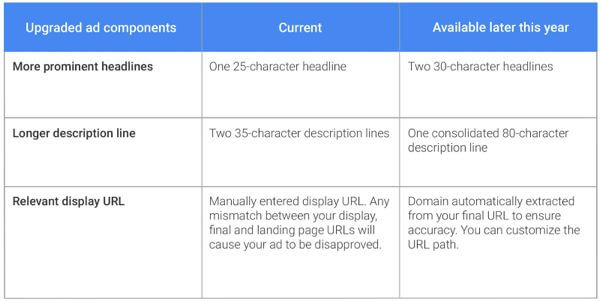
The changes and additions include expanded description lines, responsive display ads to fit different devices and formats, more customized bidding options, and pilot features for Google Maps which allow advertisers to introduce more information about their businesses.

Of the trillions of searches, more than half now happen on a mobile phone. Google has also found that more than half of all web traffic comes from smartphones and tablets.

1. Expanded text ads

The description line will also increase from two 35-character description lines to one consolidated 80-character description line.

Currently, if a manually entered display URL does not match final and landing page URLs, they are disapproved. Under the change, domains will automatically be extracted from the final URL to ensure accuracy and the URL path can be customized.

These upgrades will be especially relevant for advertisers wanting to reach the “on-the-go mobile consumer” who wants to know exactly what products and services are available before tapping into a website.

2. Responsive display ads

Consumers on mobile are now engaging with content from mobile sites, from apps and from video. But for marketers, there is an ongoing challenge to create ads to fit across all these device sizes and formats.

Google’s new tool – responsive ads for display – are designed to help advertisers develop ads to counter the diverse content, shapes, and sizes across the more than two million publisher sites and apps on the Google Display Network (GDN).

It’s an important move because advertisers no longer have to resize display ads depending on the site or device they showed up on. Headlines, a description, an image, and a URL will be enough for Google to now automatically design the responsive ads.

3. Bidding for a mobile

AdWords will soon allow advertisers to set individual bid adjustments for each device type (mobile, desktop and tablet). Previously, the process was more manual with each device embedded into ad campaigns through Google’s Enhanced Campaigns tool.

4. Connecting online and offline with mobile

Particularly relevant for marketers is Google’s findings that location-related mobile searches are growing 50% faster than all other mobile searches. The platform says nearly one third of all mobile searches made on Google are today related to location.

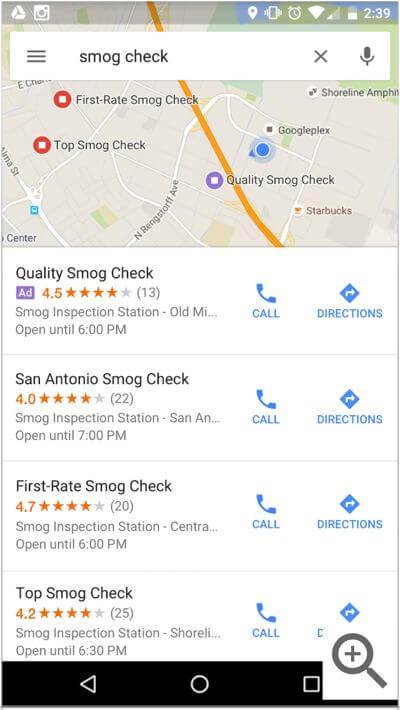
The search platform is introducing new local search ads across Google.com and Google Maps to reach consumers as they search for physical business locations.

Google Maps
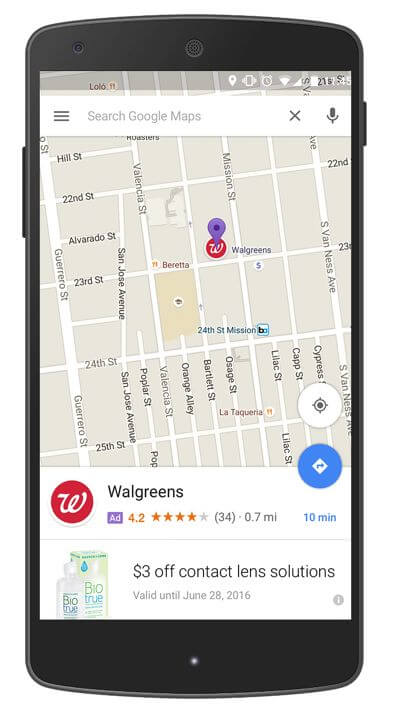
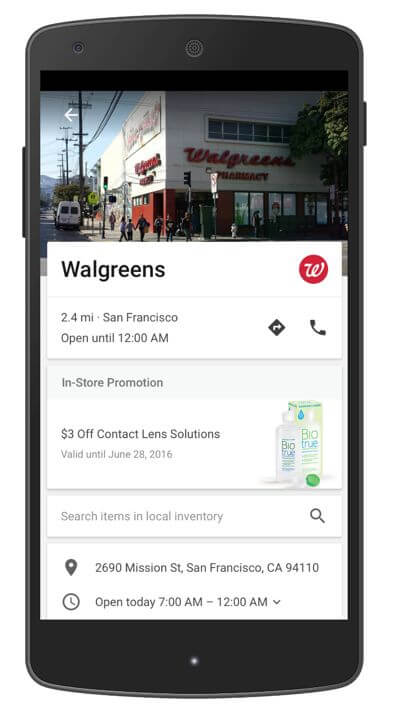
New features on Google Maps will also allow businesses to develop more branded, customized experiences in two ways.

Google is experimenting with a variety of ad formats on Maps to make it easier for users to find businesses around them. For example, a Map user could see promoted pins for nearby coffee shops or gas stations along their driving route. Here’s an example of the new promoted pins:

Local businesses can now include more detail about their businesses such as special offers or product offerings. Here is what the new business page will look like:


These latest offerings from Google AdWords reinforce the need for all businesses to understand the importance of mobile. Consumers have already made this shift, and businesses are now playing catch up.


*Image courtesy of Google AdWords


Quick and Easy SEO Tips

Quick and Easy SEO Tips and Tricks

Quick and Easy SEO Tips and Tricks

Set up a Google My Business account

Get all of your business details uploaded. It’s free and will enable you to appear in local search results.

Build a fast, mobile-friendly website

Mobile sites can now be done easily with simple plugins for your CMS, such as WordPress, meaning that making all of your content mobile-friendly can be done quickly and cheaply.

Conduct extensive keyword research

Targeting the same keywords as your bigger competitors won’t see you make much ground as they are more established and have more coverage online.

Using keyword research tools such as Google’s Keyword Planner

Start using Google Search Console

It’s a free tool that gives a wealth of information about your website’s performance in Google search, as well as any errors.

Look at how search engines are displaying results in your niche

Small businesses have no idea who or what they are actually competing with in search.

Claim your physical address on Google Maps

If it’s a local business which a physical location and offline customers, make sure you claim your physical address on Google Maps.

Launch a blog / create content

Content is what will help you rank for your target terms. This means content on product pages, homepages and everywhere around the site.

If you blog, do it regularly

You don’t have to write five articles a day, but regular updates mean your visitors have something to read.

Use a clear URL structure

People should be able to guess the topic of a page just by looking at the URL.

Use internal linking to optimise your site

Internal linking is about linking topics and themes together .

Encourage reviews

Reviews will help to drive conversions but.

Set up Google Analytics

It’s free and it’s essential for you to understand customer behaviour, traffic sources and more.

Use a little PPC

If you have the budget, PPC can deliver traffic more quickly.

Make sure that you use Quick and Easy SEO Tips and Tricks.


Posted in SEO

Content marketing and SEO

Content marketing and SEO

Content marketing and SEO


Every digital marketer knows the wonders of content marketing. B2B marketers have a content marketing strategy, according to research from Content Marketing Institute. From building trust and authority with readers, to increasing targeted customer engagement, generating more leads, and ultimately increasing sales, content marketing has been a marketing game changer, especially for B2B brands.

Search engine optimization is another equally important pillar in digital marketing. Organic search results and increasing traffic to your site is a critically important piece.

Search engine platforms get smarter and it becomes increasingly difficult for brands to keep their SEO high. Google alone changes its search algorithm around 500 to 600 times per year, making high Search engine optimization  less of a guarantee and more of a long-term goal brands must approach strategically.

The solution to this is rooted in content marketing. Put simply, this means creating content designed not to sell a specific product, but rather to promote a larger brand narrative.

Search engine optimization improves your content marketing and, in turn, content marketing increases your SEO. These digital strategies complement and feed one another.

Many marketers have the misconception that Search engine optimization strategy should not include content marketing, and content marketing doesn’t need to consider SEO, but Search engine optimization and content marketing greatly enhance each other when used strategically.

Posted in SEO

The ideal shopping cart page

The ideal shopping cart page Prime Promo Ecommerce WooCommerce

The ideal shopping cart page

What is the purpose of the shopping cart page? 

It’s the last stage before customers enter the checkout. 

  • Confirming the contents of the cart and the total cost.
  • Answering any questions customers have before they progress to checkout.
  • Increasing basket value with relevant cross-selling.
  • An opportunity to modify the contents of shopping bags.

Some customers will have no need to review details – perhaps they’re confident that they’ve added everything correctly, maybe they’re in a hurry.

The PayPal button will be familiar to users.

Unexpected shipping costs were the number one reason given for checkout abandonment.

Though some retailers leave voucher/promotional code entry until almost the last step of checkout most customers will be expecting to enter codes sooner.

They will want to know if the code works successfully, and the total price after the discount has been applied.

Add logos which back up checkout security: Norton Secure, Verisign etc.

Summarising available payment options helps reassure people that their preferred method is available.

The ideal shopping cart page display clear contact details provides an option for customers to ask any questions and for the retailer to deal with last minute doubts.

A clear phone number, as shown below, is one way. Live chat is another good option for immediate contact.

If you offer free delivery for orders of a certain size, then it’s good to promote it .

People may add things by accident or change their mind. Let them edit basket contents easily on the basket page.

Subscription commerce wins

Subscription commerce wins Prime Promo Webdesign Ecommerce

Subscription commerce wins


“The influence of subscription commerce is so large that it’s forcing even the largest corporations to follow suit,” say Retention Science in their latest infographic.

Now that the subscription industry is expanding under the influence of better funding, Retention Science wanted to examine where subscription companies are excelling and where they can improve in order to avoid the same fate as flash sale sites – analysing information across flash sale, subscription and standard retail.

Subscription commerce wins


Contextual Commerce Change Shopping Experience

Contextual Commerce Change Shopping Experience

Contextual Commerce Change Shopping Experience


Contextual commerce combines the power of data from smartphones with the ease of interaction in physical spaces. 

Idea of “contextual commerce”  is, products that are delivered to a consumer as and when they are needed. 

Contextual commerce flips these current shopping paradigms on their head, turning the purchasing process into something that works in the customer’s favor — and not against them.

Contextual Commerce Change Shopping Experience, using data from devices like wearables, smartphones, and smart thermostats, the Internet of Things can help to streamline the shopping process. More importantly, it can ease the way we interact with products in physical spaces, not just in the online realm where it’s mostly been confined up until now.

The big issue with contextual commerce is that it treads a thin line between ultra-convenience and some potential breaches in privacy. 

The widespread effects of these changes in the digital world, their gradual move into our physical lives will drastically blur the lines between our online and real-life experiences.


This site uses cookies to offer you a better browsing experience. By browsing this website, you agree to our use of cookies.